8.2 Arrays
An array is a data structure that stores several elements of the same data type under one identifier. Each element is accessed by an index. In this topic you need to understand one-dimensional and two-dimensional arrays and how iteration is used to declare, populate and access them.
8.2.1 One- and Two-dimensional arrays
Arrays allow many related data items to be stored in a uniform way. Every item uses the same array identifier, while the index identifies the position of a particular element. This makes it possible to access items individually, search through a list and place values into a useful order.
| Array idea | Meaning |
|---|---|
| Identifier | The common name used for all elements in the array. |
| Element | One individual data item stored in the array. |
| Index | The position used to access a particular element. |
| Data type | All elements in an array have the same data type. |
The first index may be zero or one. The textbook notes that most programming languages automatically use zero as the first index. For Cambridge IGCSE Computer Science you need to work with both one-dimensional and two-dimensional arrays.
MyList[1] contains 19, then 1 is the index and 19 is the element value.8.2.2 Declaring and populating arrays with iteration
One-dimensional arrays
A one-dimensional array can be treated as a list. The textbook example MyList contains ten integer elements with indexes from 0 to 9.
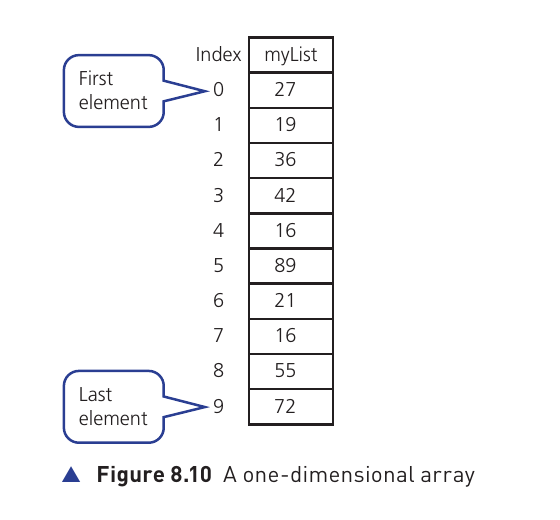
When declaring a one-dimensional array in pseudocode, include the array name, first index, last index and data type:
DECLARE MyList : ARRAY[0:9] OF INTEGERAn individual position can be assigned directly. In the source example:
MyList[4] ← 27The entire array can instead be populated using a loop. The loop counter is used as the index:
OUTPUT "Enter these 10 values in order 27, 19, 36, 42, 16, 89, 21, 16, 55, 72"
FOR Counter ← 0 TO 9
  OUTPUT "Enter next value "
  INPUT MyList[Counter]
NEXT Counter
To display one element, refer to its index. For the array shown in Figure 8.10:
OUTPUT MyList[1]This outputs 19.
Populating a one-dimensional array when it is declared
| Language | Example |
|---|---|
| Python | myList = [27, 19, 36, 42, 16, 89, 21, 16, 55, 72] |
| Visual Basic | Dim myList = New Integer() {27, 19, 36, 42, 16, 89, 21, 16, 55, 72} |
| Java | int[] myList = {27, 19, 36, 42, 16, 89, 21, 16, 55, 72}; |
Two-dimensional arrays
A two-dimensional array can be treated as a table of rows and columns. The source example MyTable has ten rows and three columns, giving thirty elements. Its first element is at position 0,0.
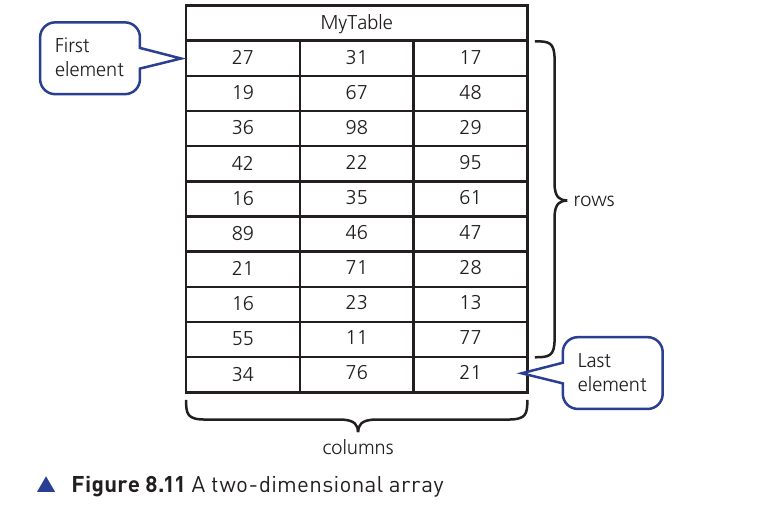
When declaring a two-dimensional array in pseudocode, include the first and last row indexes, the first and last column indexes, and the data type:
DECLARE MyTable : ARRAY[0:9,0:2] OF INTEGERPopulating a two-dimensional array requires nested loops: one loop changes one index while the other changes the second index.
OUTPUT "Enter these values in order 27, 19, 36, 42, 16, 89, 21, 16, 55, 34"
OUTPUT "Enter these values in order 31, 67, 98, 22, 35, 46, 71, 23, 11, 76"
OUTPUT "Enter these values in order 17, 48, 29, 95, 61, 47, 28, 13, 77, 21"
FOR ColumnCounter ← 0 TO 2
  FOR RowCounter ← 0 TO 9
    OUTPUT "Enter next value "
    INPUT MyTable[RowCounter, ColumnCounter]
  NEXT RowCounter
NEXT ColumnCounter
For the table shown, the element at row index 2 and column index 1 is 98.
OUTPUT MyList[2,1], even though the two-dimensional array on the page is named MyTable. The intended access to the shown table is therefore MyTable[2,1], which gives 98.Python and arrays
The textbook notes an important difference: Python normally uses lists rather than arrays. A Python list can contain different data types, while an array is defined here as containing elements of the same type. A two-dimensional structure in Python is created by placing lists inside another list.
Populating a two-dimensional array when it is declared
| Language | Example form |
|---|---|
| Python | MyTable = [[27, 31, 17], [19, 67, 48], ...] |
| Visual Basic | Dim MyTable = New Integer(8, 2) {{27, 31, 17}, ...} |
| Java | int[][] MyTable = {{27, 31, 17}, {19, 67, 48}, ...}; |
Regardless of the programming language, the key idea is the same: a two-dimensional structure stores values by two positions, and nested iteration is a natural way to process every element.