1.1 Number systems
Computers use binary internally, but Computer Science students must be able to move confidently between binary, denary and hexadecimal, understand where hexadecimal is used, add binary values, recognise overflow, perform logical shifts and represent signed integers using two’s complement.
What you need to know
This page covers the complete Topic 1.1 sequence from the supplied course book. The explanations are rewritten in simpler language, but the scope remains the same: how binary represents data; the three number systems and conversions; uses of hexadecimal; addition and overflow; logical shifts; and two’s complement for positive and negative integers.
Jump to a subtopic
Binary represents data
Whatever kind of data a computer is working with—numbers, text, images, sound or instructions—it must ultimately be represented in a form the computer’s electronic circuits can store and process. That form is binary.
Binary uses only two digits: 0 and 1. This matches the two-state nature of the tiny electronic switches inside digital systems. A simplified model is:
1 → ON
A switch or electronic state is active/on.
0 → OFF
A switch or electronic state is inactive/off.
These two states can be combined into very long patterns of bits. The patterns can represent values and instructions, and the computer can use logic gates to store and process them.
Binary, denary and hexadecimal systems
Denary (base 10)
Denary is the everyday number system. It has ten digits, 0–9, and each position is a power of 10. For example, in 25,177 the columns represent 10,000s, 1,000s, 100s, 10s and units.
Binary (base 2)
Binary has only two digits, 0 and 1. Each position is a power of 2. An 8-bit binary value uses the place values shown below.
| Power | 2⁷ | 2⁶ | 2⁵ | 2⁴ | 2³ | 2² | 2¹ | 2⁰ |
|---|---|---|---|---|---|---|---|---|
| Value | 128 | 64 | 32 | 16 | 8 | 4 | 2 | 1 |
Binary → denary
Add the place values wherever there is a 1. For example:
Example
10110110
128 + 32 + 16 + 4 + 2 = 182.
The same method works for 8-bit, 12-bit, 16-bit or larger values; you simply continue the powers of two.
Denary → binary: two methods
Method 1 — powers of two
Starting with the largest useful power of two, subtract it from the denary value. Put 1 in a column you use and 0 in a column you do not use.
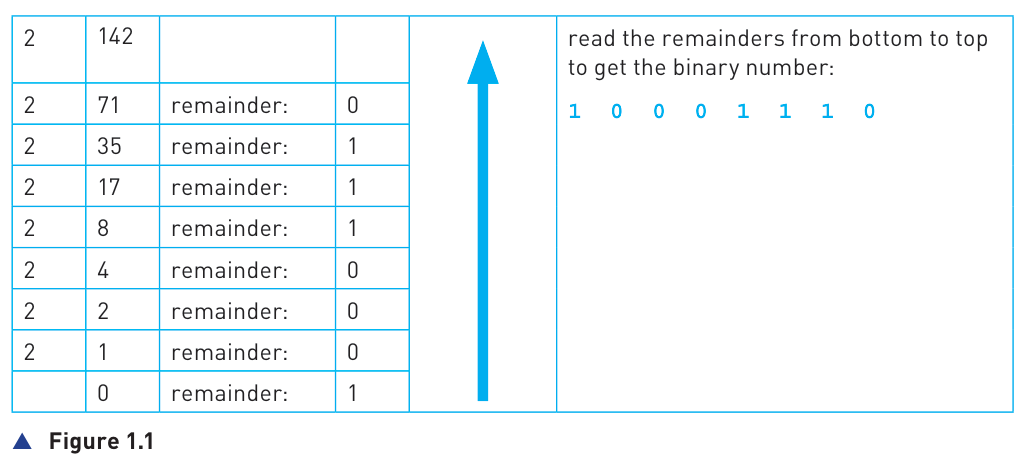
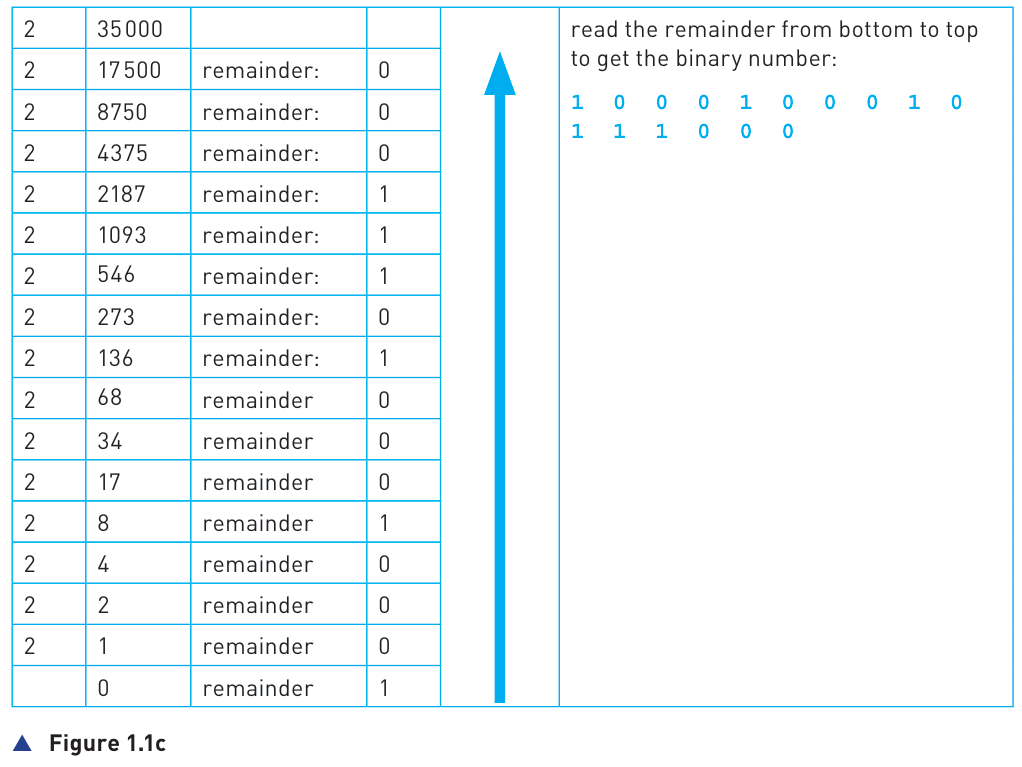
Method 2 — repeated division by 2
Divide by 2 repeatedly, recording every remainder. When the quotient reaches 0, read the remainders from bottom to top.
Hexadecimal (base 16)
Hexadecimal, often shortened to hex, needs sixteen symbols. It uses 0–9 followed by A–F for denary values 10–15. Because 16 = 2⁴, one hexadecimal digit corresponds exactly to four binary bits.
| Binary | Hex | Denary | Binary | Hex | Denary |
|---|---|---|---|---|---|
| 0000 | 0 | 0 | 1000 | 8 | 8 |
| 0001 | 1 | 1 | 1001 | 9 | 9 |
| 0010 | 2 | 2 | 1010 | A | 10 |
| 0011 | 3 | 3 | 1011 | B | 11 |
| 0100 | 4 | 4 | 1100 | C | 12 |
| 0101 | 5 | 5 | 1101 | D | 13 |
| 0110 | 6 | 6 | 1110 | E | 14 |
| 0111 | 7 | 7 | 1111 | F | 15 |
Binary ↔ hexadecimal
Binary to hex: start at the right, divide the bits into groups of four, and pad the left-most group with leading zeros if necessary. Convert each group using the table above.
Example
1011 1110 0001 → B E 1 → BE1
Hex to binary: replace every hex digit with its four-bit equivalent, then join the groups together.
Hexadecimal ↔ denary
To convert hex to denary, use powers of 16. For a three-digit hex number the place values are 256, 16 and 1. Remember A–F mean 10–15.
Example: 4A5₁₆
4×256 + 10×16 + 5 = 1024 + 160 + 5 = 1189.
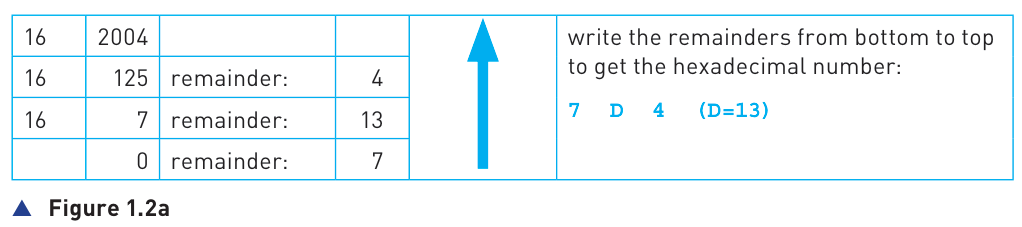
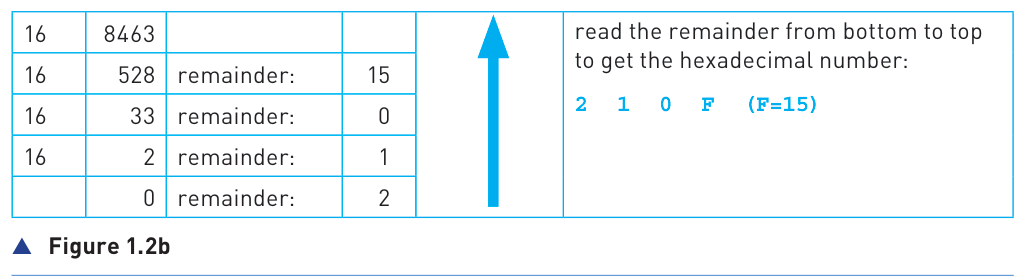
To convert denary to hex, repeatedly divide by 16, record each remainder, convert remainders 10–15 to A–F, then read the remainders from bottom to top.
Use of the hexadecimal system
Computers still work internally with binary. Hexadecimal is useful mainly because it gives people a shorter, more readable way to write binary values: one hex digit replaces four binary bits. For example, a 16-bit binary pattern can be written using only four hex digits.
Error codes
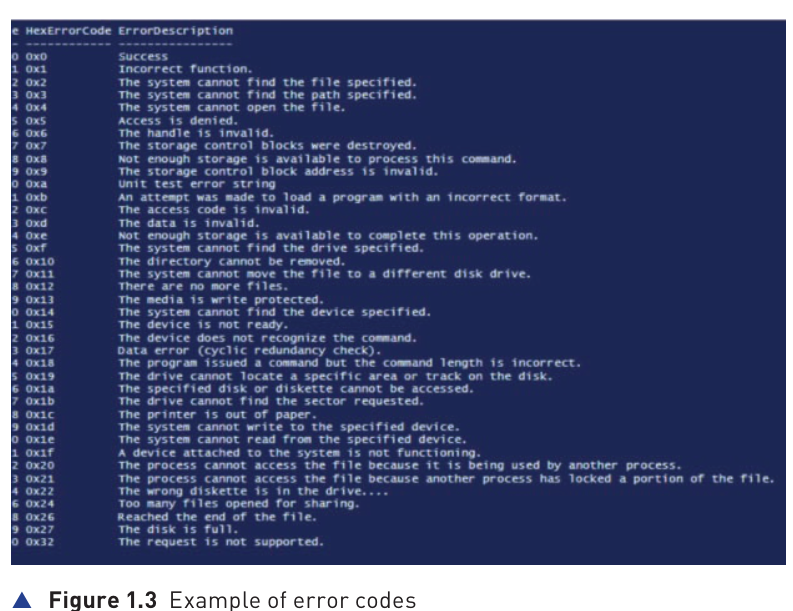
System error codes are often displayed in hexadecimal. The code can identify an error or the memory/location associated with it, helping programmers and technicians interpret what went wrong.
MAC addresses
A MAC address identifies a network interface. A common 48-bit MAC address is displayed as six groups of two hexadecimal digits, for example 00:1C:B3:4F:25:FE. The first half identifies the manufacturer and the second half identifies the device/interface serial part. 64-bit forms also exist.
IP addresses
IPv4 is a 32-bit address and is commonly shown in denary dotted notation. IPv6 uses 128 bits and is commonly written as hexadecimal groups separated by colons, making a very long binary address manageable for people.
HTML colour codes
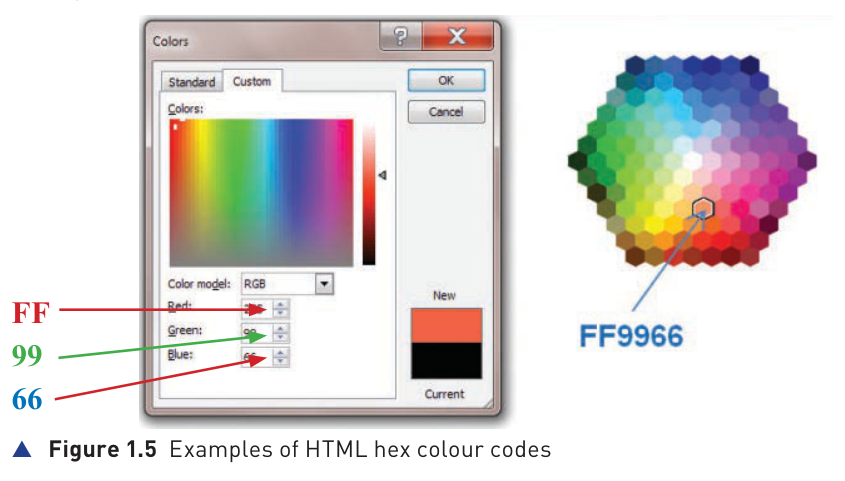
Web colours can be written as #RRGGBB. Each pair ranges from 00 to FF, so red, green and blue each have 256 possible intensity values.
HTML colour codes in more detail
The six digits after the # symbol represent red, green and blue, two hex digits each. Examples:
| Code | Meaning |
|---|---|
| #FF0000 | maximum red, no green, no blue |
| #00FF00 | maximum green |
| #0000FF | maximum blue |
| #FF00FF | red + blue → fuchsia |
| #FF8000 | orange |
There are 256 possible red values × 256 green values × 256 blue values = 16,777,216 possible RGB colours.
Addition of binary numbers
Binary addition follows the same column-by-column idea as denary addition, but because binary has only 0 and 1, you carry whenever the total for a column is greater than 1.
| Addition | Carry | Write as sum bit |
|---|---|---|
| 0 + 0 | 0 | 0 |
| 0 + 1 | 0 | 1 |
| 1 + 0 | 0 | 1 |
| 1 + 1 | 1 | 0 |
| 1 + 1 + 1 | 1 | 1 |
Example
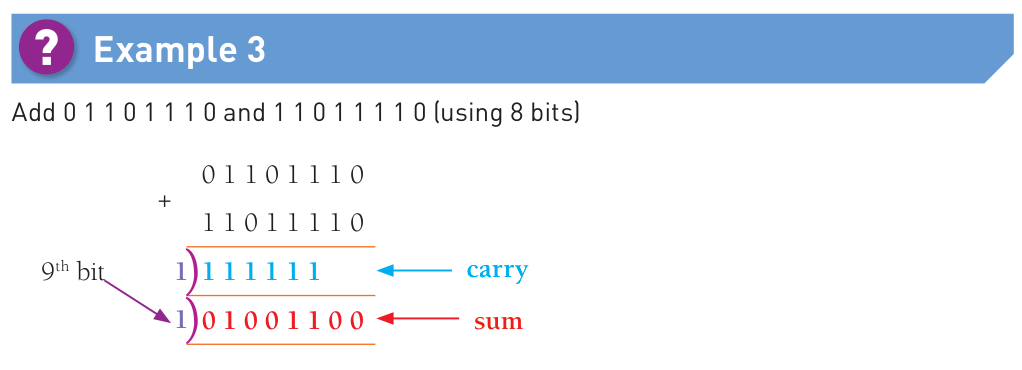
Add 00110101 and 01000110.
00110101
+01000110
────────
01111011
The result is 123 denary, matching 53 + 70.
Overflow
An unsigned 8-bit register can store values from 0 to 255. If an addition needs a ninth bit, the true answer is too large for the 8-bit register. This is an overflow error.
8 bits → 255 · 16 bits → 65,535 · 32 bits → 4,294,967,295
Logical binary shifts
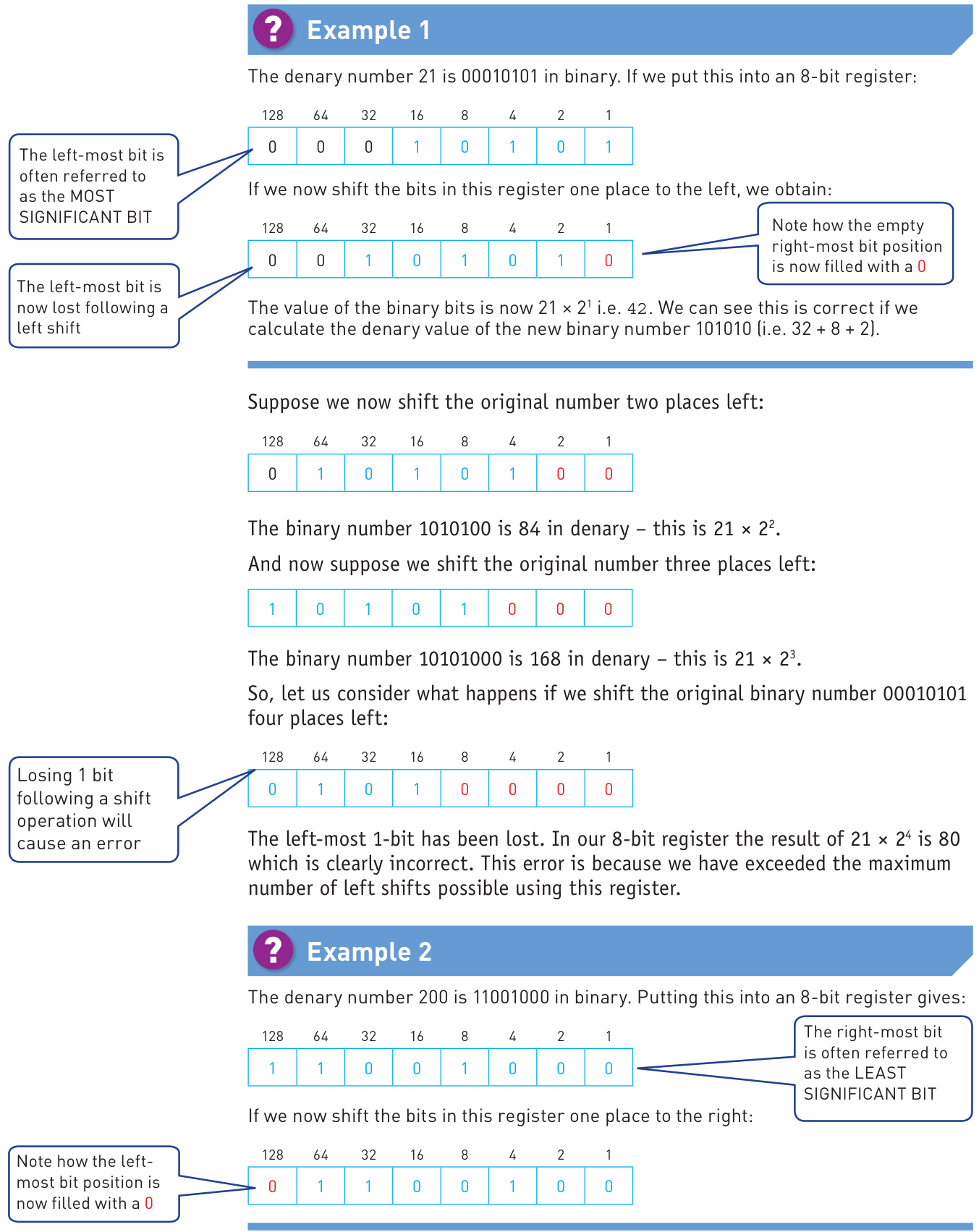
A logical shift moves every bit left or right by a stated number of positions. Vacated bit positions are filled with 0.
Shift left
When no significant 1-bit is lost, each one-place left shift multiplies the value by 2. Two places multiply by 2², three places by 2³, and so on.
Shift right
When no significant 1-bit is lost, each one-place right shift divides the value by 2. Two places divide by 2², and so on.
The left-most bit is the most significant bit (MSB); the right-most bit is the least significant bit (LSB).
Example
00010110 represents 22.
Shift left twice → 01011000 = 88, which is 22 × 4.
Shift right once from the original → 00001011 = 11.
Two’s complement (binary numbers)
So far, ordinary 8-bit examples have treated all values as positive. Two’s complement provides a standard way to use the same fixed number of bits to represent both positive and negative integers.
8-bit place values
| Bit position | MSB | LSB | ||||||
|---|---|---|---|---|---|---|---|---|
| Two’s-complement weight | −128 | 64 | 32 | 16 | 8 | 4 | 2 | 1 |
The left-most bit now has a negative weight. In 8 bits the range is −128 to +127. A leading 0 indicates a non-negative value; a leading 1 indicates a negative value.
Positive values
Positive values are written in the same way as ordinary binary, but the most significant bit must be 0. For example, +38 is 00100110.
Two’s-complement binary → denary
Use the place values, including the negative left-most weight. For example:
Example: 11101011₂
−128 + 64 + 32 + 8 + 2 + 1 = −21.
Negative denary → two’s-complement binary
Method 1 — use the negative place value
Start with −128 in an 8-bit number, then use positive place values to reach the required negative total.
Method 2 — invert and add 1
- Write the positive value in the required number of bits.
- Invert every bit (0↔1).
- Add 1.
Example: −37 in 8 bits
+37 = 00100101
Invert → 11011010
Add 1 → 11011011
The same principle works for other bit widths. With 4 bits the range is −8 to +7; with 12 bits it is −2048 to +2047. The course-book example demonstrates this with a 12-bit value as well as 8-bit values.